

Connect your order/transactions data for Order Insight & CE 3.0
Choose how Justt gets your order data to answer Order Insight and Compelling Evidence 3.0 requests, and how to build the Order Lookup endpoint.
Justt answers Order Insight (OI) and Compelling Evidence 3.0 (CE) requests with your order data. Choose one of three ways to give Justt that data:
| Option | Does Justt get access to your transactions? | What you do | When to choose it | Merchant dev effort |
|---|---|---|---|---|
| 1. Justt holds your transactions (Read Only) | Yes | Connect your payment provider with transaction access, and Justt fetches them. Send the order details your provider doesn’t have (such as IP, device, account ID, and others) to the Transaction endpoint. If your provider isn’t connected, send all your transactions there. | You’re fine sharing transactions with Justt in advance. Provider + order details gives the best results. | Low |
| 2. Justt asks your system | No | Build an Order Lookup endpoint. Justt asks it for one order at a time, and your system finds the order. | You don’t want to share your transactions with Justt in advance. | Medium |
The rest of this page explains option 2.
Who does whatYou build and host the endpoint. Justt calls it. Your Justt contact turns the connection on.
Option 2: Connect your order system (Order Lookup API)
How it works
- Visa asks Justt about a card transaction (Order Insight), or about a past purchase for a disputed transaction (Compelling Evidence).
- Justt sends one HTTPS
POSTrequest to your endpoint for that one order. - Your endpoint finds the order and returns its data.
- Justt sends the data to Visa.
Justt calls your endpoint in two cases:
-
Order Insight (
sourceisOIorOID). A cardholder asks their bank about a transaction. Justt asks you for that order. -
Compelling Evidence 3.0 (
sourceisCE). A cardholder disputes a transaction. Visa looks for earlier, undisputed purchases by the same cardholder. Justt asks you for each past purchase, one request per purchase.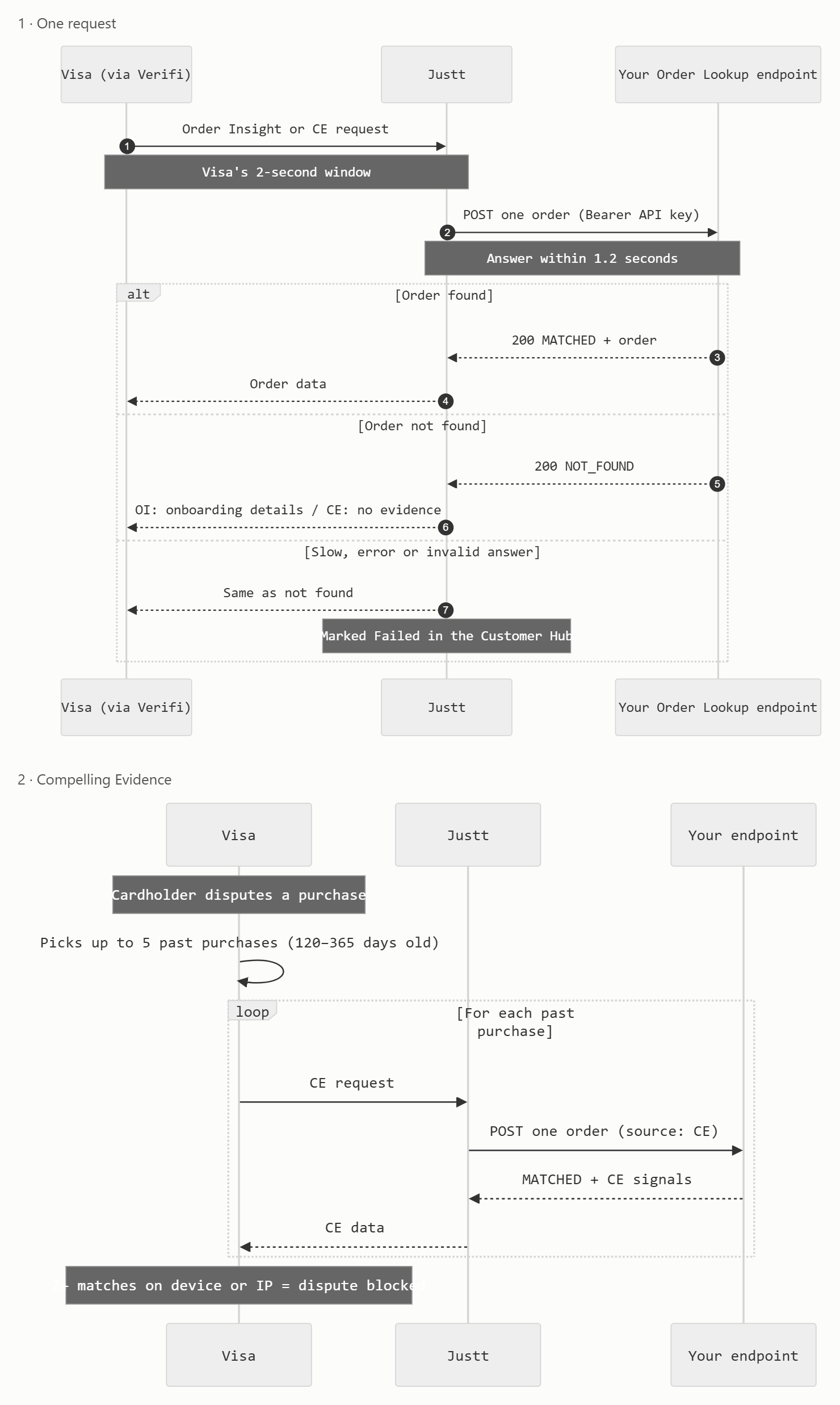
The rules of the call
- One request is about one order. There is no list call and no batch call.
- Justt sends every identifier it has for the order. Optional identifiers are sent only when Justt has them.
- Always answer with HTTP
200and a JSON body:- Order found:
{"matchStatus": "MATCHED", "order": {...}} - Order not found:
{"matchStatus": "NOT_FOUND"}
- Order found:
- Use the same response shape for Order Insight and Compelling Evidence. Send all the data you have. Justt chooses what to send to Visa.
- Do not send your merchant name, website, phone number or store name. Justt has them from onboarding.
Authentication
You create an API key and give it to your Justt contact. Justt sends it in every request:
Authorization: Bearer <API key>Reject a request without the correct key with HTTP 401.
Time limit
Answer within 1.2 secondsVisa gives Justt about 2 seconds to answer. If your endpoint is slower than 1.2 seconds, Justt does not use your answer.
Which orders you must find
- Any order up to 365 days old.
- For Compelling Evidence, Visa asks about up to 5 past purchases, made 120 to 365 days before the dispute. Justt sends a separate request for each one.
How to find the order
Search by the identifiers you store, from the strongest to the weakest:
arn(Acquirer Reference Number),transactionIdorauthCodepurchaseIdentifier(often your order number)cardBin+cardLast4+transactionAmount+transactionDate
If more than one order matches and you cannot choose one, answer NOT_FOUND.
Examples
Order Insight
Request:
{
  "insightId": "7d1e5b2c-4f0a-4c39-9b8e-1f2a3b4c5d6e",
  "source": "OI",
  "verifiEntityInfo": { "partnerId": 37478, "clientId": 85126 },
  "cardBin": "400000",
  "cardLast4": "1111",
  "transactionDate": "2026-05-01T10:00:00Z",
  "transactionAmount": { "amount": 59.9, "currency": "USD" },
  "arn": "24692166123000000000012",
  "authCode": "123456",
  "transactionId": "581234567890123",
  "acquirerBin": "400000",
  "cardAcceptorId": "SHOPEXAMPLE0001",
  "paymentDescriptor": "SHOPEXAMPLE*ORDER",
  "mcc": "5661"
}
Response:
{
  "matchStatus": "MATCHED",
  "order": {
    "receipt": {
      "orderDate": "2026-05-01T09:58:12Z",
      "orderNumber": "ORD-1001",
      "purchaseCategory": "MERCHANDISE",
      "orderTotalAmount": { "amount": 59.9, "currency": "USD" },
      "paymentInformation": {
        "paymentMethod": "VISA **** 1111",
        "billingName": "Dana Levi",
        "billingAddressDetails": {
          "address1": "1 Main St",
          "city": "Austin",
          "postalCode": "73301",
          "country": "US"
        },
        "cvvChecked": true
      },
      "productsPurchasedList": [
        {
          "productDescription": "Running shoes, size 42",
          "quantity": 1,
          "unitPriceAmount": { "amount": 49.9, "currency": "USD" }
        }
      ]
    },
    "customerInformation": {
      "firstName": "Dana",
      "lastName": "Levi",
      "accountId": "cust-42",
      "emailAddress": "[email protected]"
    },
    "deliveryAddress": { "address1": "1 Main St", "city": "Austin", "postalCode": "73301", "country": "US" },
    "recipientCustomerName": "Dana Levi",
    "deliveryDetails": {
      "shippingCarrier": "UPS",
      "trackingNumber": "1Z999AA10123456784",
      "deliveryStatus": "DELIVERED"
    },
    "device": { "ipAddress": "203.0.113.24", "deviceId": "8f14e45fceea167a5a36", "deviceType": "mobile" }
  }
}
Compelling Evidence (one past purchase)
Request:
{
  "insightId": "2b9c0e1f-77a1-4e0d-8c55-0a1b2c3d4e5f",
  "source": "CE",
  "verifiEntityInfo": { "partnerId": 37478, "clientId": 85126 },
  "cardBin": "400000",
  "cardLast4": "1111",
  "transactionDate": "2026-01-12T18:30:00Z",
  "transactionAmount": { "amount": 24.5, "currency": "USD" },
  "transactionId": "581234567000001"
}
Response (same shape as Order Insight):
{
  "matchStatus": "MATCHED",
  "order": {
    "receipt": {
      "orderDate": "2026-01-12T18:29:40Z",
      "orderNumber": "ORD-0713",
      "purchaseCategory": "SERVICE",
      "orderTotalAmount": { "amount": 24.5, "currency": "USD" },
      "productsPurchasedList": [{ "productDescription": "Monthly subscription", "quantity": 1 }]
    },
    "customerInformation": { "accountId": "cust-42", "emailAddress": "[email protected]" },
    "device": { "ipAddress": "203.0.113.24", "deviceId": "8f14e45fceea167a5a36" }
  }
}
Order not found
{ "matchStatus": "NOT_FOUND" }Test request
A test request has the header X-Justt-Test: true, and its insightId starts with test-. The card and amount may not match a real order. Answer with any example order from your system, so Justt can check the response.
POST /your-order-lookup-path HTTP/1.1
Authorization: Bearer <API key>
X-Justt-Test: true
Content-Type: application/json

{
  "insightId": "test-0f8c2a",
  "source": "OI",
  "cardBin": "400000",
  "cardLast4": "1111",
  "transactionDate": "2026-05-01T10:00:00Z",
  "transactionAmount": { "amount": 1, "currency": "USD" }
}
Data points
| Level | Meaning |
|---|---|
| Required | Needed for every matched order. |
| Required for OI | Needed for Order Insight. If you do not send it, Justt uses your default from onboarding. |
| CE: 2 of 4 | Part of one of the four Compelling Evidence elements. Send at least 2 of the 4. device.deviceId and device.deviceFingerprint together count as one element. See the rules below. |
| Recommended | Helps the issuer recognize the purchase. Send it if you have it. |
| If applicable | Send it when it exists for this order. |
| Optional | Send it if you have it. |
| Field | Level | Notes |
|---|---|---|
matchStatus | Required | MATCHED or NOT_FOUND |
receipt.productsPurchasedList[].productDescription | Required for OI | At least one product. If missing, Justt uses your default description from onboarding |
receipt.orderDate | Recommended | ISO 8601 |
receipt.orderNumber | Recommended | |
receipt.orderTotalAmount | Recommended | { amount, currency }. Both are required when you send an amount |
receipt.purchaseCategory | Recommended | MERCHANDISE (physical goods) or SERVICE (services and digital goods) |
receipt.paymentInformation.paymentMethod | Recommended | Card brand and masked number. Never the full card number |
receipt.paymentInformation.billingName | Recommended | |
receipt.paymentInformation.billingAddressDetails | Recommended | |
receipt.paymentInformation.cvvChecked | Optional | true or false |
receipt.invoiceNumber | Optional | |
receipt.subTotalAmount, receipt.taxAmount | Optional | |
receipt.shippingAndHandlingAmount | If applicable | |
receipt.productsPurchasedList[].quantity | Recommended | |
receipt.productsPurchasedList[].unitPriceAmount | Recommended | |
receipt.productsPurchasedList[].productUrl | Optional | |
receipt.productsPurchasedList[].productType | Optional | |
receipt.productsPurchasedList[].artistOrSeller | If applicable | Marketplaces and digital content |
customerInformation.accountId | CE: 2 of 4 | The same id for every purchase by the same customer |
customerInformation.firstName, lastName | Recommended | |
customerInformation.emailAddress | Recommended | |
customerInformation.lengthOfRelationship | Optional | For example 2 years |
deliveryAddress | CE: 2 of 4; required for physical goods | address1 and country in clear text |
recipientCustomerName | If applicable | |
deliveryDetails.shippingCarrier, trackingNumber | If applicable | Physical goods |
deliveryDetails.dateOfShipment, dateOfDelivery | If applicable | Physical goods |
deliveryDetails.deliveryStatus | If applicable | See the allowed values in the OpenAPI file |
device.ipAddress | CE: 2 of 4 | Public IPv4 or IPv6, plain text |
device.deviceId | CE: 2 of 4 | 15 to 32 characters. One element together with deviceFingerprint |
device.deviceFingerprint | CE: 2 of 4 | 20 to 45 characters. One element together with deviceId |
device.deviceType, deviceName | Optional |
Compelling Evidence rules
Visa names four CE elements:
- IP address:
device.ipAddress - Device ID or device fingerprint:
device.deviceIdordevice.deviceFingerprint. These two fields together count as one element. Sending both does not count as two elements. - Account / login ID:
customerInformation.accountId - Shipping (delivery) address:
deliveryAddress
- Send at least 2 of the 4 elements.
- At least 1 of them must be the IP address, or the device ID or device fingerprint.
- For physical goods, also send
deliveryAddress. An order is physical goods whenpurchaseCategoryisMERCHANDISE, or when it has ashippingCarrieror atrackingNumber.
A field that fails a data-quality rule does not count for rules 1 and 2. The device element counts when device.deviceId or device.deviceFingerprint passes its rule.
Data-quality rules
device.ipAddressis the customer's public IPv4 or IPv6 address in plain text. Do not hash or mask it. Justt rejects these ranges:0.0.0.0/8,10.0.0.0/8,172.16.0.0/12,192.168.0.0/16100.64.0.0/10(carrier-grade NAT)127.0.0.0/8(loopback),169.254.0.0/16(link-local)224.0.0.0/3(multicast and reserved)::,::1,fc00::/7,fe80::/10,ff00::/8- IPv4-mapped IPv6 forms of the IPv4 ranges above, for example
::ffff:10.0.0.1
device.deviceIdhas 15 to 32 characters.device.deviceFingerprinthas 20 to 45 characters.deliveryAddresshasaddress1andcountryin clear text. Do not hash or maskaddress1: Justt rejects a value with*, 32 or more hex characters, or 40 or more base64 characters without spaces.countryis an ISO 3166-1 alpha-2 code, for exampleUS, in any case. Justt checks it only in the delivery address used for Compelling Evidence.- Every amount has both
amountandcurrency.amountis a number in major units (59.9, not"59.90"and not5990).currencyis an ISO 4217 code in capital letters, for exampleUSD. - A field that is
null, empty ("") or only spaces counts as not sent. receipt.productsPurchasedListhas at most 100 items.- Fields that are not in the contract are ignored.
When something goes wrong
A NOT_FOUND answer is a normal answer, not a failure. For Order Insight, Justt still answers Visa with your onboarding details. For Compelling Evidence, Visa receives no evidence for that purchase.
These are the failure reasons you may see:
| Reason | What it means | How to fix it |
|---|---|---|
| Merchant timeout | Your endpoint did not answer within 1.2 seconds. | Make the search fast: index the identifiers you search by, and do not call slow services during the request. |
| No order data from merchant | Your endpoint returned an error, rejected the API key, could not be reached, or sent a body that does not follow this contract or these rules. | Check the endpoint is reachable and the API key is correct. Check your response against the OpenAPI file and the rules on this page. |
If your endpoint keeps failing, Justt stops calling it for a short time and then tries again.
Test before go-live
- Deploy your endpoint. Give your Justt contact its URL and your API key.
- Ask your Justt contact to run a test request.
- Justt sends a request with
X-Justt-Test: trueand shows the result. It lists every rule that failed and what to fix. - Fix the failed rules and ask for another test.
We strongly recommend passing a test before your Justt contact turns on live traffic.
OpenAPI file
Updated 20 days ago