

Sandbox Environment
The Justt Sandbox environment allows you to test the complete chargeback lifecycle without affecting production data or incurring real costs. This testing environment enables you to simulate chargebacks, move them through different statuses, and validate your webhook integrations.
Overview
The Justt Sandbox environment allows you to test the complete chargeback lifecycle without affecting production data or incurring real costs. This testing environment enables you to simulate chargebacks, move them through different statuses, and validate your webhook integrations.
Key Features
- Create Test Chargebacks: Generate chargebacks with realistic data from various PSPs
- Lifecycle Simulation: Move chargebacks through all stages from creation to resolution
- Webhook Testing: Validate that your webhook endpoints correctly handle status changes
- Safe Testing: Isolated environment that doesn't impact production systems
- Multi-PSP Support: Test with data from Stripe, PayPal, Braintree, and other payment processors
Getting Started
Base URL
All sandbox API calls use the sandbox base URL:
https://api.justt.ai/v1/sandboxAuthentication
The sandbox uses the same Bearer-token scheme as production — include your token in the Authorization header:
Authorization: Bearer YOUR_API_TOKENSandbox and production use separate tokens. You obtain a token the same way in both environments, but the token itself is environment-specific — use your sandbox token for sandbox endpoints and your production token for production.
You can find your sandbox token in the integration section of the hub, under API Integration:
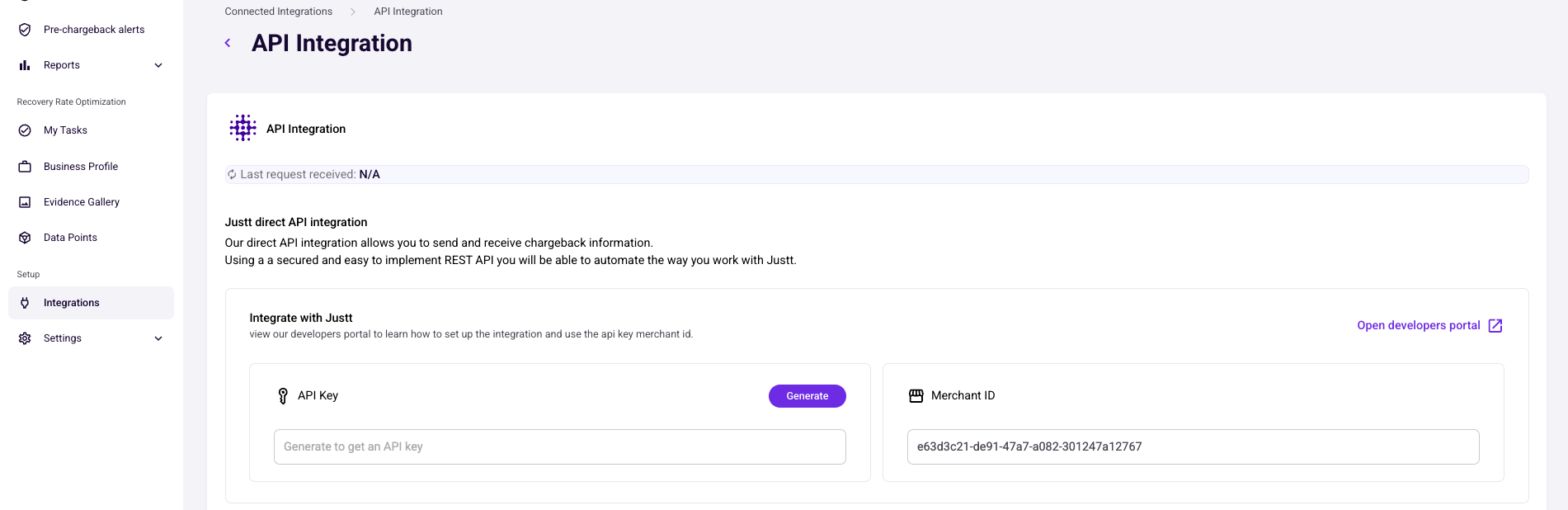
As with production keys, treat your sandbox token as a secret — don't commit it to source control or expose it in client-side code.
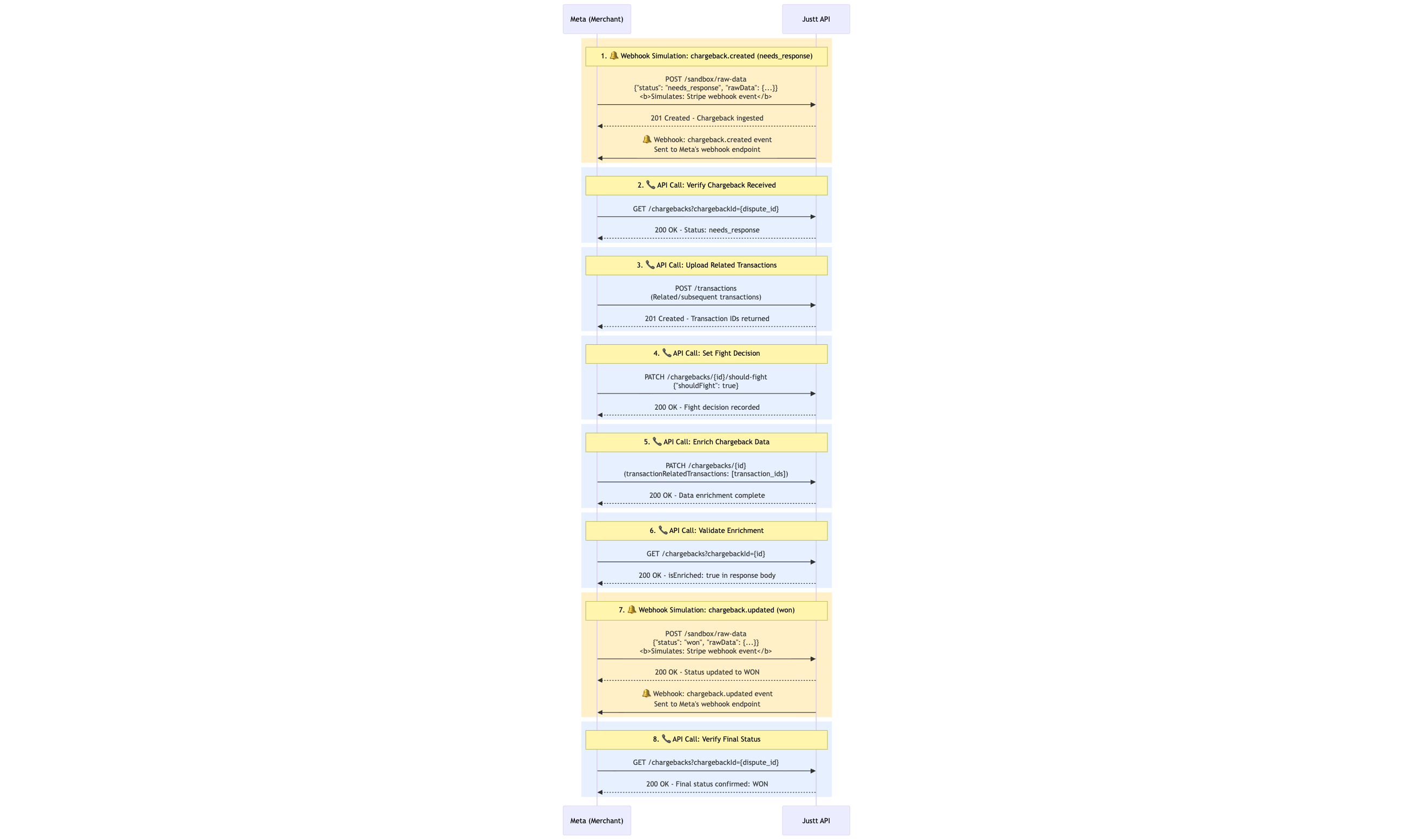
Full flow
Creating Sandbox Chargebacks
Endpoint
POST /sandbox/raw-dataRequest Format
The sandbox endpoint accepts raw PSP data in the same format as the psp data. This allows you to test with realistic data structures.
Required Fields
| Field | Type | Description |
|---|---|---|
dataSource | string | PSP name (e.g., "stripe", "paypal", "braintree") |
dataSourceVersion | string | API version of the data source (e.g., "2024-06-20") |
dataType | string | Type of data - use "chargebacks" for disputes |
integrationId | string | Your integration ID (provided by Justt) |
requestTimeStamp | string | ISO 8601 timestamp of the request |
rawData | object | PSP-specific chargeback data |
Example: Creating a Stripe Chargeback
Initial State: needs_response
needs_responseWhen a chargeback is first created and requires merchant response:
{
  "dataSource": "stripe",
  "dataSourceVersion": "2024-06-20",
  "dataType": "chargebacks",
  "integrationId": "your_integration_id",
  "requestTimeStamp": "2024-01-15T10:30:00Z",
  "rawData": {
    "id": "du_test_needs_response_001",
    "object": "dispute",
    "amount": 12500,
    "charge": "ch_test_payment_001",
    "created": 1705320600,
    "currency": "usd",
    "evidence": {
      "customer_email_address": "[email protected]",
      "customer_name": "John Smith",
      "billing_address": "123 Main St\nNew York, NY 10001, US"
    },
    "evidence_details": {
      "due_by": 1706011199,
      "has_evidence": false,
      "past_due": false,
      "submission_count": 0
    },
    "payment_intent": "pi_test_intent_001",
    "payment_method_details": {
      "card": {
        "brand": "visa",
        "case_type": "chargeback",
        "network_reason_code": "10.4"
      },
      "type": "card"
    },
    "reason": "fraudulent",
    "status": "needs_response"
  }
}
Simulating the Chargeback Lifecycle
You can move a chargeback through its lifecycle by sending updated data with different status values. Each status change will trigger webhook notifications if you have them configured.
Stripe Chargeback Statuses
| Status | Description | Webhook Triggered |
|---|---|---|
needs_response | Initial state - merchant must respond | ✓ |
under_review | Evidence submitted, awaiting decision | ✓ |
won | Merchant won the dispute | ✓ |
lost | Merchant lost the dispute | ✓ |
Example: Moving to under_review
under_reviewAfter evidence has been submitted:
{
  "dataSource": "stripe",
  "dataSourceVersion": "2024-06-20",
  "dataType": "chargebacks",
  "integrationId": "your_integration_id",
  "requestTimeStamp": "2024-01-16T14:20:00Z",
  "rawData": {
    "id": "du_test_needs_response_001",
    "object": "dispute",
    "amount": 12500,
    "charge": "ch_test_payment_001",
    "evidence": {
      "customer_email_address": "[email protected]",
      "customer_name": "John Smith",
      "billing_address": "123 Main St\nNew York, NY 10001, US",
      "shipping_documentation": "file_tracking_proof",
      "customer_communication": "file_email_thread"
    },
    "evidence_details": {
      "due_by": 1706011199,
      "has_evidence": true,
      "past_due": false,
      "submission_count": 1
    },
    "reason": "fraudulent",
    "status": "under_review"
  }
}
Example: Resolution - Won
When the merchant successfully disputes the chargeback:
{
  "dataSource": "stripe",
  "dataSourceVersion": "2024-06-20",
  "dataType": "chargebacks",
  "integrationId": "your_integration_id",
  "requestTimeStamp": "2024-01-20T09:45:00Z",
  "rawData": {
    "id": "du_test_needs_response_001",
    "object": "dispute",
    "amount": 12500,
    "balance_transactions": "[{\"amount\":12500,\"type\":\"dispute_reversal\"}]",
    "charge": "ch_test_payment_001",
    "evidence_details": {
      "has_evidence": true,
      "submission_count": 1
    },
    "is_charge_refundable": true,
    "reason": "fraudulent",
    "status": "won"
  }
}
Example: Resolution - Lost
When the dispute is unsuccessful:
{
  "dataSource": "stripe",
  "dataSourceVersion": "2024-06-20",
  "dataType": "chargebacks",
  "integrationId": "your_integration_id",
  "requestTimeStamp": "2024-01-20T09:45:00Z",
  "rawData": {
    "id": "du_test_needs_response_001",
    "object": "dispute",
    "amount": 12500,
    "charge": "ch_test_payment_001",
    "evidence_details": {
      "has_evidence": true,
      "submission_count": 1
    },
    "is_charge_refundable": false,
    "reason": "fraudulent",
    "status": "lost"
  }
}
Webhook Integration Testing
When you update a chargeback status in the sandbox, Justt will trigger webhooks to your configured endpoints, allowing you to test your integration:
- Configure Webhooks: Set up webhook endpoints in your Justt dashboard
- Create Test Chargeback: Send initial chargeback data with
needs_responsestatus - Verify Webhook: Confirm your endpoint received the creation webhook
- Update Status: Send updated data with
under_reviewstatus - Verify Updates: Confirm your endpoint received the status change webhook
- Test Resolution: Send final status (
wonorlost) and verify final webhook
Expected Webhook Payload
Your webhook endpoint will receive payloads similar to:
{
  "event": "chargeback.status_changed",
  "timestamp": "2024-01-15T10:30:45Z",
  "data": {
    "chargeback_id": "du_test_needs_response_001",
    "psp": "stripe",
    "status": "under_review",
    "amount": 125.00,
    "currency": "usd",
    "reason": "fraudulent"
  }
}
Testing Multiple PSPs
The sandbox supports testing with multiple PSP formats. Here are examples for common payment processors:
Stripe
Use dataSource: "stripe" with Stripe dispute object format (shown above)
PayPal
Use dataSource: "paypal" with PayPal dispute object format
Braintree
Use dataSource: "braintree" with Braintree dispute object format
Refer to the PSP-specific documentation for exact data formats.
Querying Sandbox Chargebacks
You can query sandbox chargebacks using the standard /chargebacks endpoint. The sandbox environment maintains separate data from production.
Example Query
GET https://api.justt.ai/v1/chargebacks?psp=stripe&status=under_review&limit=50This will return chargebacks from your sandbox environment.
Best Practices
1. Use Unique Identifiers
Always use unique IDs for each test chargeback to avoid conflicts:
"id": "du_sandbox_test_001"2. Test the Complete Lifecycle
Don't just test creation - move chargebacks through all statuses:
needs_response→under_review→won/lost
3. Validate Webhook Signatures
Ensure your webhook handler validates signatures in sandbox before deploying to production
4. Test Error Scenarios
Try sending invalid data to verify your error handling:
- Missing required fields
- Invalid status transitions
- Malformed data
Limitations
- Sandbox data is isolated and doesn't appear in production
- Historical data from production is not available in sandbox
- Some advanced features may behave differently in sandbox
- Rate limits apply separately to sandbox and production
Troubleshooting
Webhooks Not Received
- Verify webhook URL is configured in dashboard
- Check that endpoint is publicly accessible
- Review webhook logs in Justt dashboard
- Confirm SSL certificate is valid
Invalid Data Errors
- Verify
dataSourcematches PSP format - Check required fields are present
- Ensure timestamps are in ISO 8601 format
- Validate JSON syntax
Status Not Updating
- Use the same chargeback
idfor updates - Verify status transition is valid for the PSP
- Check that
integrationIdmatches - Review API response for error details
Updated 5 months ago